Specifications
Complete hardware specifications and platform compatibility for ReaSnow S2, the 3rd-generation multi-platform gaming converter.
This page lists every hardware specification, supported platform, and compatibility limitation of ReaSnow S2.
Port Layout
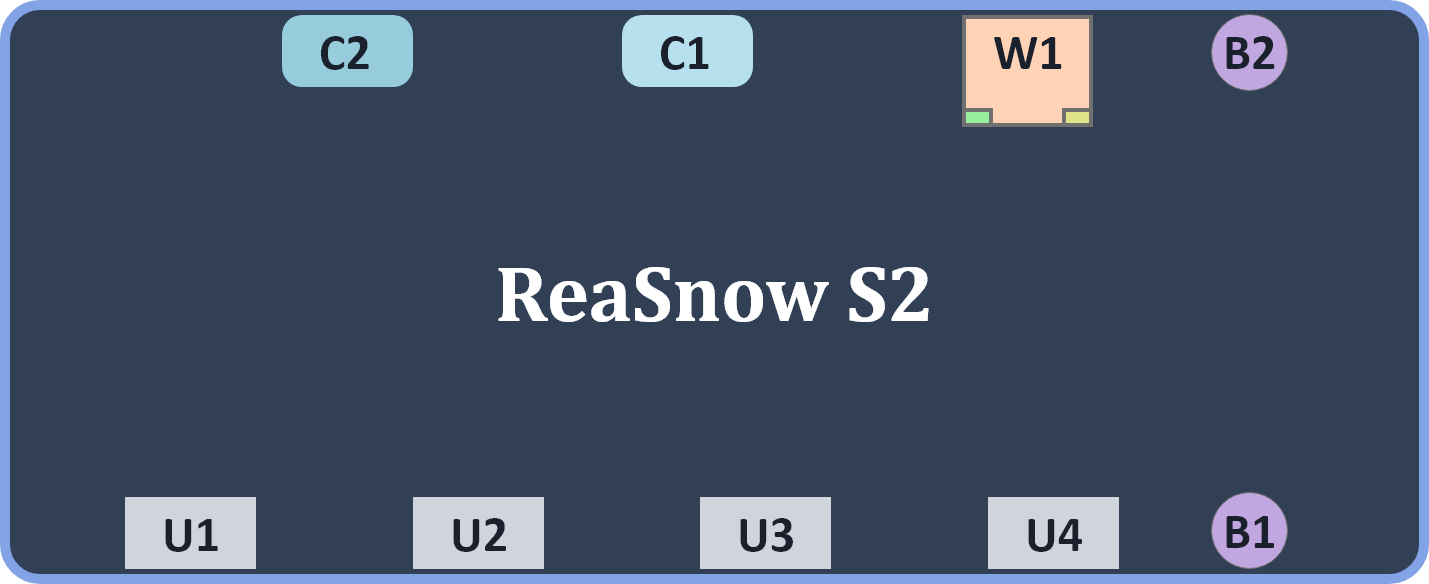
| Pin | Interface Type | Typical Use | Notes |
|---|
| U1 | USB-A | Authentication controller | Official controller for your console |
| U2 | USB-A | mouse,keyboard,controller,etc | input device |
| U3 | USB-A | mouse,keyboard,controller,etc | input device |
| U4 | USB-A | mouse,keyboard,controller,etc | input device |
| C1 | USB-C | Primary output | Main console / PC |
| C2 | USB-C | Secondary output | PC |
| W1 | RJ45 Ethernet | Remote Play dedicated network port | Low-latency wired LAN |
| B1 | Power Button | Power on/off | Long press to toggle |
| B2 | Firmware/Bluetooth Button | Press for BT pairing | Press for BT pairing; hold for firmware upgrade |
Hardware Specifications
| Parameter | Value |
|---|
| Product Name | ReaSnow S2 |
| Generation | 3rd-Gen (S1 = 2nd, CrossHair = 1st) |
| Dimensions (L × W × H) | 120 × 60 × 24 mm |
| Weight | 95 g |
| Color | Black |
| USB-A Ports | 4 (U1–4 — connect peripherals: mouse, keyboard, controller, joystick) |
| USB-C Ports | 2 (C1/C2 — output to console/PC) |
| Ethernet | 1 (W1 — RJ45, dedicated for Remote Play) |
| Bluetooth | BLE (connect to ReaSnow Manager APP on mobile) |
| Button 1 | Firmware upgrade mode / Bluetooth pairing |
| Button 2 | Power switch |
| Config Slots | 16 (stored in built-in Flash) |
| Power | USB-C bus power (no external adapter needed) |
| Firmware Update | BLE OTA via APP |
| Operating Temperature | −10 ~ 50°C |
| Operating Humidity | ≤ 90% |
| Package Contents | S2 device ×1, USB-C cable ×1, Quick Start leaflet ×1 |
| Platform | Supported | Authentication Method | Notes |
|---|
| PS5 | ✅ | P5G (direct) / P5MATE (adapter) / Remote Play (LAN) | Three connection options |
| PS4 | ✅ | DS4 controller on USB1 | — |
| PS3 | ❌ | — | Not supported |
| Xbox Series X|S | ✅ | XSX|XSS controller on USB1 | — |
| Xbox One | ✅ | XB1 controller on USB1 | — |
| Xbox 360 | ❌ | — | Not supported |
| Nintendo Switch 1/2 | ✅ | No auth device required | Enable “Pro Controller Wired Communication” |
| PC (XB360 mode) | ✅ | No auth device required | Plug and play |
PS5 Connection Options
| Feature | P5G (Direct) | P5MATE (Adapter) | Remote Play (LAN) |
|---|
| Latency | Very low | Very low | Low |
| Vibration | — | ✅ | ✅ |
| Gyro | — | — | — |
| Adaptive Triggers | — | — | — |
| Controller Audio | — | — | — |
Unsupported Features
S2 is a keyboard and mouse converter. The following features are not supported and are marked for clarity:
| Feature | Status | Notes |
|---|
| Steering Wheel (Force Feedback) | ❌ | Including Expert Mode, Legacy Mode, clutch, H-shifter, sequential shifter, handbrake |
| Gyroscope (Gyro) | ❌ | — |
| Adaptive Triggers (PS5) | ❌ | — |
| PS5 Controller Audio Output | ❌ | Not available in P5G mode |
| Bluetooth Audio Devices | ❌ | No Bluetooth headphone support |
| USB Audio Devices | ❌ | No audio passthrough |
| Pedals (Racing) | ❌ | Part of steering wheel subsystem |
| PS3 | ❌ | Platform not supported |
| Xbox 360 | ❌ | Platform not supported |
Peripheral Compatibility Summary
| Category | Status | Details |
|---|
| Gaming Mice | ✅ | USB wired and 2.4 GHz wireless (via receiver). Recommended DPI: 4000–16000. Max report rate: 1000 Hz. |
| Gaming Keyboards | ✅ | USB wired. Recommended 6-Key Rollover minimum, NKRO preferred. |
| Official Controllers | ✅ | DS5, DS4, Xbox Series, Xbox One — used for authentication + input |
| Elite Controllers | ✅ | Xbox Elite, DualSense Edge — extra buttons may need additional setup |
| Third-Party Controllers | ✅ | Partial — refer to compatibility list |
| Flight Sticks (Joystick/HOTAS) | ✅ | Including stand-alone throttle |
| Arcade Sticks | ✅ | — |
| Steering Wheels | ❌ | No support |
| Bluetooth Mouse/Keyboard | ❌ | Direct BLE connection to S2 not supported — use USB or 2.4 GHz receiver |
Recommended Mouse Settings
| Setting | Recommendation |
|---|
| DPI | 4000–16000 |
| USB Report Rate | 250–1000 Hz |
| Acceleration | OFF |
⚙️ Advanced: Each Game Config calibrates the Intelligent Mouse Engine for its target game. Set your in-game settings to what the config recommends.