ReaSnow S1
ReaSnow 2nd-Gen Converter. The next-generation high-end gaming converter, featuring upgraded Intelligent Mouse Engine, ultra-low latency, and enhanced FPS mouse optimization for competitive gamers.
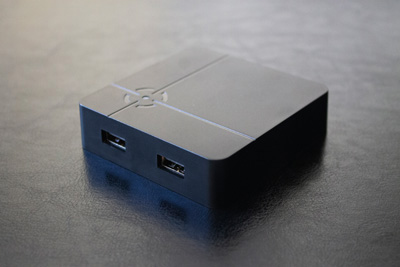
ReaSnow S1 is a top-tier gaming converter created by ReaSnow Team.
It embeds professional mouse optimization for FPS games.
Accurate and stable aiming can be achieved easily with your preferred mouse and keyboard.
And it’s also an all-around converter compatible with most consoles on the market:
- PlayStation: PS5*, PS4 Pro/Slim, PS4, PS3
- Xbox: Series X|S, One X|S, One, 360
- Nintendo: Switch
- PC: Windows
* PS5 requires an additional adapter.
Keyboards, mice, wheels, flight sticks, arcade sticks, and third-party gamepads are all supported.
Beyond these industry-leading capabilities, the device is designed for simple, intuitive operation.
Once you set up the ReaSnow S1, you’ll experience a brand-new way to play your games.
1 - Download
Everything You Need for ReaSnow S1
(Updated Date: Apr-28-2026)
1 - ReaSnow S1 Firmware Tool (Latest stable version = v5.6.251)
Version LOGMacOS: Download
2 - ReaSnow Manager APP V1.6.40 (Android>=4.4, iOS>=8.0)
2.1 Android Phones:DownloadNote: Download and install this APP(apk file), do not install from Google Play!
2.2 iOS Phones(Apple Phones)
Search "ReaSnow Manager" in App Store
3 - ReaSnow S1-UserManual
Visit4 - Hardware Support
A list of all the tested keyboards, mice, controllers, steering wheels, etc
Hardware Support List
ReaSnow is well known for its excellent compatibility, 99% of the keyboards and mice in the market are supported.
Below is a list of what we have tested.
If your peripherals are not listed here,it might still be compatible with our product.
And if any trouble, we are here to help you!
Mouse
| 🏭Producer | 🖱️Model |
|---|
| A4Tech | Bloody TL5 |
| A4Tech | Bloody TL6 |
| A4Tech | Bloody TL7 |
| A4Tech | D-500F |
| A4Tech | G10-810F |
| A4Tech | XL-747H |
| Asus | GX800 |
| Asus | ROG Gladius |
| CM Storm | Alcor |
| CM Storm | Inferno |
| CM Storm | Sentinel Advance II |
| Corsair | M60 |
| Corsair | M65 |
| Corsair | Nightsword RGB |
| Finalmouse | Starlight Pro TenZ |
| Fuhlen | X300 |
| Gigabyte | GM-M8000X |
| Logitech | G100s |
| Logitech | G102 |
| Logitech | G300 |
| Logitech | G300s |
| Logitech | G303 |
| Logitech | G304 |
| Logitech | G400 |
| Logitech | G400s |
| Logitech | G402 |
| Logitech | G403 |
| Logitech | G5 |
| Logitech | G500 |
| Logitech | G500s |
| Logitech | G502 |
| Logitech | G600 |
| Logitech | G602 |
| Logitech | G603 |
| Logitech | G700 |
| Logitech | G700s |
| Logitech | G703 |
| Logitech | G9x |
| Logitech | G900 |
| Logitech | G903 |
| Logitech | G Pro |
| Logitech | M180 |
| Logitech | M185 |
| Logitech | M310 |
| Logitech | M510 |
| Logitech | M570 |
| Logitech | M705 |
| Logitech | MK240 |
| Logitech | MK250 |
| Logitech | MX500 |
| Logitech | MX510 |
| Logitech | MX518 |
| Mad Catz | MMO7 |
| Mad Catz | RAT3 |
| Mad Catz | RAT5 |
| Mad Catz | RAT7 |
| Mad Catz | RAT9 |
| Mad Catz | RAT PRO X |
| Microsoft | IntelliMouse |
| Microsoft | Sidewinder |
| Rapoo | 7800p |
| Rapoo | V3 |
| Rapoo | V900 |
| Razer | Abyssus |
| Razer | Basilisk V2 |
| Razer | Copperhead |
| Razer | DeathAdder2013 |
| Razer | Deathadder V3 |
| Razer | Imperator |
| Razer | Mamba |
| Razer | Naga |
| Razer | Naga Hex |
| Razer | Naga Epic |
| Razer | Naga 2014 |
| Razer | Taipan |
| Razer | Ouroboros |
| Razer | Viper Ultimate |
| Roccat | Kone |
| SteelSeries | WOW: Cataclysm MMO |
| SteelSeries | Ikari |
| SteelSeries | Kana |
| SteelSeries | Kinzu |
| SteelSeries | Sensei RAW |
| Targus | AMW56EU |
| Thermaltake | Azurues |
| Thermaltake | Black |
| Thermaltake | Level 10 M |
| Thermaltake | Saphira |
| Thermaltake | Theron |
| Tt eSPORTS | Level 10M |
| VXE | Dragonfly R1 SE |
| ZOWIE | FK2 |
Keyboard
| 🏭Producer | ⌨️Model |
|---|
| A4Tech | Bloody B640 |
| A4Tech | KB8620D |
| A4Tech | WK-100 |
| Varmilo | Victory |
| Azeron | keypad classic |
| Belkin | Nostromo N52 |
| Cherry | MX-Board 2.0 |
| Cherry | MX-Board 3.0 |
| Cherry | MX-Board 6.0 |
| Cherry | G80-1869 |
| Cherry | G80-3000 |
| CM Storm | Devastator |
| CM Storm | Quick Fire Pro |
| CM Storm | Quick Fire Rapid |
| CM Storm | Quick Fire Stealth |
| CM Storm | Quick Fire TK |
| CM Storm | Quick Fire XT |
| CM Storm | Trigger |
| Corsair | K30 |
| Corsair | K70RGB |
| Corsair | K95 |
| Das | Professional |
| Das | Silent |
| Das | Ultimate |
| Dell | L100 |
| Delux | T9 |
| Delux | T9Plus |
| DrunkDeer | A75 |
| Ducky | DK-2087 |
| Ducky | DK-2108 |
| Ducky | DK-2108s |
| Ducky | DK-9008 |
| Ducky | DK-9087 G2 Pro |
| Ducky | DK1008L |
| Ducky | Shine II |
| FILCO | FKBN87M/EP2 |
| HP | Standard |
| HP | Omen 1100 |
| Ione | U9BL |
| IQUNIX | F97 |
| IYX | MU68 |
| KZZI | K75 |
| Leopold | FC200R |
| Leopold | FC500RT/AB |
| Leopold | FC660M |
| Logitech | G103 |
| Logitech | G105 |
| Logitech | G11 |
| Logitech | G15 |
| Logitech | G19 |
| Logitech | G5 |
| Logitech | G510 |
| Logitech | G510s |
| Logitech | G610 |
| Logitech | G613 |
| Logitech | G710+ |
| Logitech | G810 |
| Logitech | G910 |
| Logitech | G PRO X(external powered USB HUB required) |
| Logitech | K100 |
| Logitech | K120 |
| Logitech | K200 |
| Logitech | K270 |
| Logitech | K310 |
| Logitech | K345 |
| Logitech | K350 |
| Logitech | K360 |
| Logitech | K400 |
| Logitech | K400R |
| Logitech | K400PLUS |
| Logitech | K520 |
| Logitech | K750 |
| Logitech | K800 |
| Logitech | MK550 |
| Logitech | MK750 |
| Logitech | N305 |
| Mad Catz | STRIKE 7 |
| Mad Catz | V.7 |
| Microsoft | Arc |
| Microsoft | Natural |
| Microsoft | Sidewinder X4 |
| Microsoft | Wired 200 |
| Microsoft | Wired 600 |
| Microsoft | Wireless Desktop 800 |
| Monoprice | 9433 MX |
| Noppoo | CHOC Mid 87 |
| Noppoo | CHOC 104 keys |
| Noppoo | Lolita 87 |
| Noppoo | Nano 75 |
| Rapoo | 8130 |
| Rapoo | V500/V500S |
| Rapoo | V500RGB |
| PLU | ML-3000 |
| PLU | ML-87 |
| Razer | Arctosa |
| Razer | Black Widow Ultimate |
| Razer | Cyclosa |
| Razer | DeathStalker |
| Razer | Huntsman Mini |
| Razer | Lycosa |
| Razer | Nostromo |
| Razer | Orbweaver |
| Razer | Tartarus Pro |
| Realforce | R2 PFU |
| Roccat | Isku |
| Roccat | Sova |
| Saitek | Cyborg V.5 |
| Saitek | Eclipse |
| Sharkoon Skiller | SGK305 |
| Soyntec Inpput | T120 |
| Steelseries | 6G v2 |
| Steelseries | 7G |
| SteelSeries | Apex 9 Mini |
| SteelSeries | Apex Pro TKL |
| SteelSeries | Merc Stealth |
| Thermaltake | Challenger |
| Thermaltake | Knuckler |
| Thermaltake | Meka |
| Tt eSPORTS | POSEIDON ZX |
| Varmilo | VA87MRN/EGW3 |
| Wolfking | Warrior |
| Wooting | 60HE/60HE+(Analog Output) |
| Zippy | WK-620 |
| Zowie | FK |
Joystick(Flight stick)
| 🏭Producer | 🕹️✈️Model |
|---|
| Logitech | G13 |
| Logitech | Attack3 |
| Logitech | Extreme 3D Pro |
| Mad Catz | Cyborg V.1 |
| Thrustmaster | Afterburner II |
| Thrustmaster | T.Flight Hotas 4 |
| Thrustmaster | T.16000M |
| Thrustmaster | TWCS Throttle |
| Saitek | X52 PRO(Logitech) |
| Splitfish | FragFX Piranha PS4(Mode=PS4, RX/RY Axis Mode=B,manual button mapping) |
| Splitfish | FragFX Shark PS3 |
Controller
| 🏭Producer | 🎮Model | Description |
|---|
| Sony | PS5 controller(Dual Sense) | (wired/wireless) |
| Sony | PS5 controller(Dual Sense Edge) | (wired/wireless) |
| Sony | PS4 Pro controller | (wired/wireless) |
| Sony | PS4 Slim controller | (wired/wireless) |
| Sony | Dual Shock 4 | (wired/wireless) |
| Sony | Dual Shock 3 | (wired/wireless) |
| Sony | Delta-six controller | |
| Sony | Sixaxis | |
| Sony | Move Navigation Controller | (wired/wireless) |
| Microsoft | Xbox Adaptive Controller | (wired/wireless) |
| Microsoft | Xbox Series X/S controller | |
| Microsoft | Xbox One X controller | |
| Microsoft | Xbox One S controller | (wired/wireless) |
| Microsoft | Xbox One controller | |
| Microsoft | Xbox Elite Wireless Controller | |
| Microsoft | Xbox Elite Wireless Controller Series 2 | (wired/wireless) |
| Microsoft | XBOX 360 controller | |
| Microsoft | XBOX 360 Wireless Controller Receiver | |
| Microsoft | Xbox Wireless Adaptor(Gen1/Gen2) | |
| Razer | Raiju | |
| Razer | Raiju Tournament | (wired/wireless PC_BT mode) |
| Razer | Raiju Ultimate | (wired/wireless PC_BT mode) |
| Razer | Wolverine | |
| Nacon | Revolution Pro | |
| Nacon | Revolution Pro 2 | |
| Nacon | Revolution Pro 3 | (wired/wireless) |
| HORI | FC4 controller | |
| HORI | PAD4 FPS controller | |
| HORI | Steering Controller | |
| Scuf | Impact | (wired/wireless) |
| Scuf | Vantage | (wired/wireless) |
| Valve | Steam Controller | |
| PC standard controller | |
| PowerA | Xbox X/S & One Enhanced Wired Controller | |
| Nintendo | Switch Pro Controller | (wired/wireless) |
| Astro | C40 | (wired/wireless) |
| GuliKit | KingKong 2 Pro Controller | (wired/Bluetooth(Android/iOS Mode or NS Mode)/2.4G) |
| 8BitDo | Pro 2 Wired Controller(Xbox) | |
| FLYDIGI | Apex 3 | (wired/wireless dongle) |
| Betop | Asura 2 Pro+ | (wired/wireless[2.4G/BT XB1 mode]) |
| BIGBIG WON | BLITZ 2 | (wireless dongle) |
Steering Wheel
| 🏭Producer | 🚗Model |
|---|
| Logitech | Driving Force GT |
| Logitech | Driving Force Pro |
| Logitech | G25 |
| Logitech | G27 |
| Logitech | G29 |
| Logitech | G920 |
| Thrustmaster | T300 RS |
Arcade Stick
| 🏭Producer | 🕹️Model |
|---|
| HORI | RAP PRO.V HAYABUSA |
| Hit Box | Smash Box |
| Mad Catz | Arcade FightStick PRO(PS3) |
| Standard PC Arcade Stick |
5 - Beta Test
Be the first to try our new features!
(Updated Date: Apr-28-2026)
1 - ReaSnow S1 Firmware Tool (Beta version = v5.7.3)
Version LOGBeta firmware can be automatically fetched by S1FirmwareTool-v4
Windows: Download
MacOS: Download
2 - ReaSnow Manager APP V1.6.40 (Android>=4.4, iOS>=8.0)
2.1 Android Phones:DownloadNote: Download and install this APP(apk file), do not install from Google Play!
2.2 iOS Phones(Apple Phones)
install “testflight” from APP store,
and then click the following URL to get our beta APP.
https://testflight.apple.com/join/byYqE7bN
Version Log:
(Feb-14-2025)
Firmware V5.6.240
- improve Wooting keyboard compatibility
(Jan-14-2025)
Firmware V5.6.238
- improve SAB 2.0
- add SWAP L/R sticks
APP V1.6.39
- add SWAP L/R sticks
(Dec-19-2024)
Firmware V5.6.235
- fix an occasional unstable turning issue
- fix a USB Report Rate bug in P5MATE mode
- improve BIGBIG WON BLITZ 2 wireless receiver support
- improve anti-recoil macro V2 while the mouse curve is changed
(Dec-2-2024)
Firmware V5.6.230
- fix some mapping issues
APP V1.6.38
- improve file management
(Nov-29-2024)
Firmware V5.6.229
- add SAB 2.0
- add more options for LS strength
APP V1.6.37
- add SAB 2.0
- add more options for LS strength
(Aug-26-2024)
Firmware V5.6.181
- improve Wooting keyboard compatibility
APP V1.6.28
- improve network stability
6 - Error Code
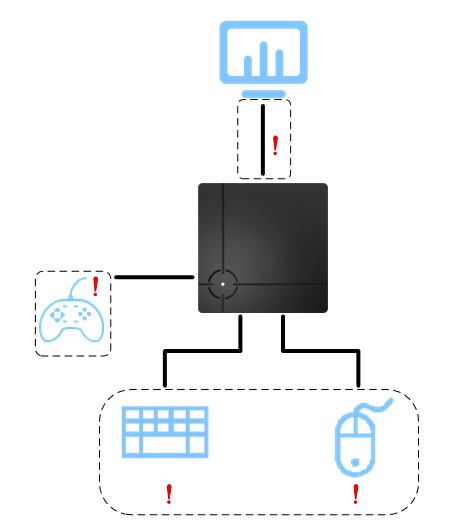
Here are some error codes that you will get from ReaSnow APP, and the solutions to address those issues.
Ports of ReaSnow S1
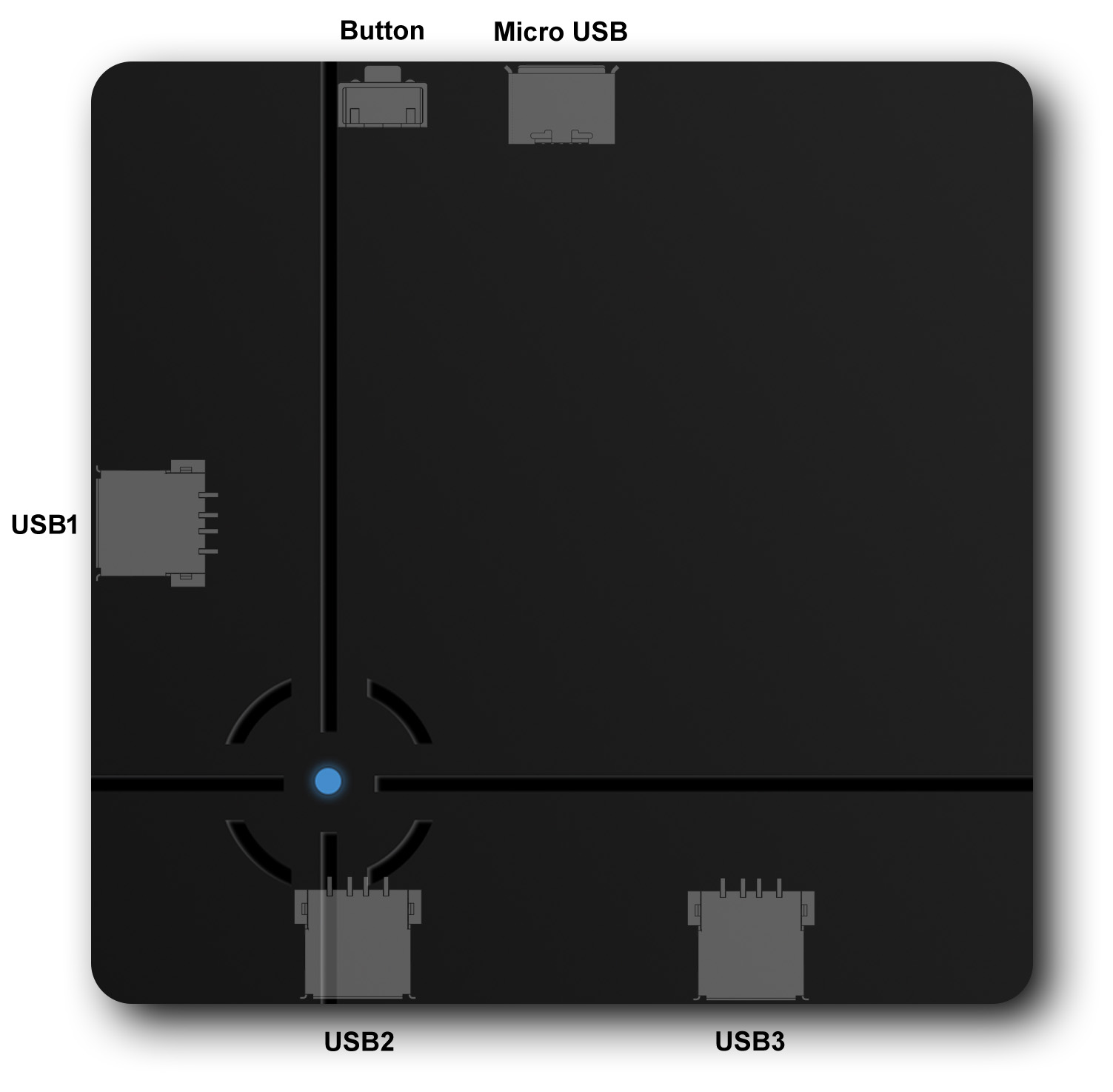
Error Codes and Solutions
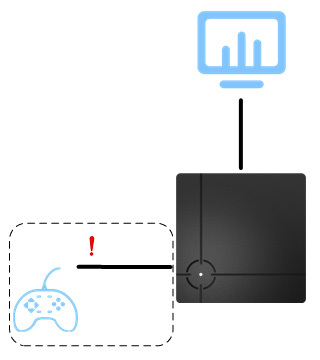
Error Code: A00100010001(LED red, 1 beep)
Cause:
no controller is detected on USB 1, or failed to enumerate authentication controller
Solution:
1.Try a new USB cable for controller
2.Change the controller to an official one or a new one
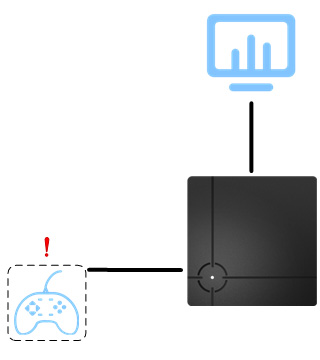
Error Code: A00100010002(LED red, 2 beeps)
Cause:
wrong peripheral is detected on USB 1
Solution:
connect a proper controller to USB 1
Error Code: A00100010003(LED red, 3 beeps)
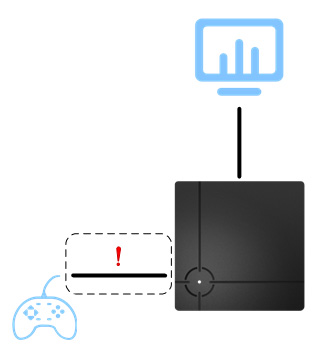
Cause:
controller disconnected from USB 1
Solution:
1.Try a new USB cable for controller
2.Change the controller to an official one or a new one
Error Code: A00100010004(LED red, 4 beeps)
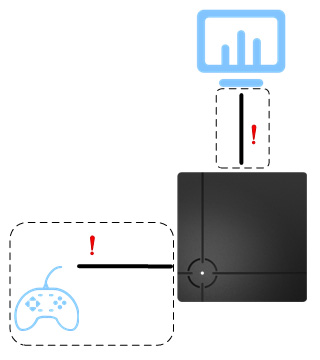
Cause:
controller authentication failure
Solution:
1.Try a new USB cable for controller or the converter
2.Change the controller to an official one or a new one
Error Code: A00100020002(LED white, 2 beeps)
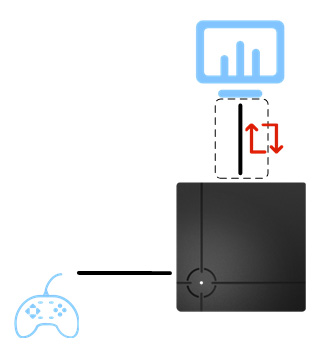
Cause:
Out Of Memory error
Solution:
1.unplug and replug ReaSnow S1
2.report to ReaSnow Team(support@reasnow.com)
Error Code: A00100030001(LED off, 1 beep)
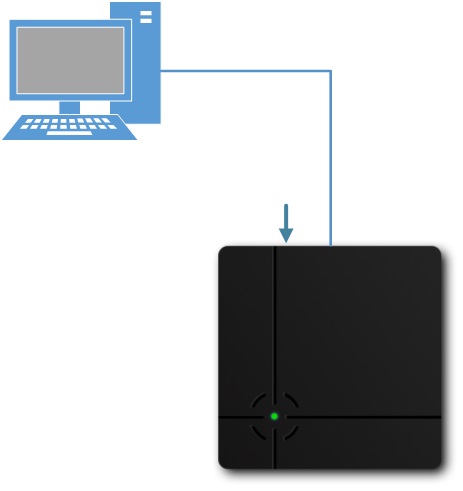
Cause:
corrupted firmware
Solution:
restore factory defaults with Flash Tool
Error Code: A00100030002(LED off, 2 beeps)
Cause:
corrupted config
Solution:
restore factory defaults with Flash Tool
Error Code: A00100030003(LED off, 3 beeps)
Cause:
abnormal firmware
Solution:
restore factory defaults with Flash Tool
Error Code: A00100030004(LED off, 4 beeps)
Cause:
abnormal boot
Solution:
restore factory defaults with Flash Tool
Error Code: A00100040001(LED blue, 1 beep)
Cause:
ESD or instantaneous high-load current
Solution:
unplug and replug ReaSnow S1
Error Code: A00100040002(LED blue, 2 beeps)
Cause:
Low voltage error
Solution:
1.Try a new USB cable for ReaSnow S1
2.remove high power-consuming peripherals
Error Code: A00100040003(LED blue, 3 beeps)
Cause:
USB HOST error
Solution:
unplug and replug ReaSnow S1
Error Code: A00100040004(LED blue, 4 beeps)
Cause:
Bluetooth chipset error
Solution:
1.unplug and replug ReaSnow S1
- report to ReaSnow Team(support@reasnow.com)
Error Code: A00100050001(LED green, 1 beep)

Cause:
corrupted BOOT
Solution:
1.unplug and replug ReaSnow S1
2.Return ReaSnow S1 for repairing
Error Code: A00100050002(LED green, 2 beeps)
Cause:
hardware failure (HUB)
Solution:
1.unplug and replug ReaSnow S1
2.Return ReaSnow S1 for repairing
Error Code: A00100050003(LED green, 3 beeps)
Cause:
hardware failure (BT)
Solution:
1.unplug and replug ReaSnow S1
2.Return ReaSnow S1 for repairing
Error Code: A00100050004(LED green, 4 beeps)
Cause:
hardware failure (Crys)
Solution:
1.unplug and replug ReaSnow S1
2.Return ReaSnow S1 for repairing
